Introduction
Background
Security research rarely targets a single repository. Identifying vulnerability variants, validating detection coverage, and assessing exposure across an organization requires running the same analysis against hundreds or thousands of codebases. Doing this manually (cloning repositories, executing queries, collecting results) does not scale.
Multi-Repository Variant Analysis (MRVA) solves the execution problem. It allows for the execution of CodeQL queries against up to 1,000 repositories in one operation via GitHub Actions. However, it does not solve the reporting problem. Results are returned as individual SARIF artifacts per repository, with no built-in mechanism to consolidate, query, or visualize them across the full analysis.
This project closes that gap. It automates downloading every SARIF file from an analysis run, normalizing results into a single SQLite database, and producing an interactive report. The entire workflow runs inside a GitHub Action. The report is published to GitHub Pages as a static single-page application with no hosted database, no backend server, and no additional security model beyond the repository’s existing access controls.
A live example is available at ghas-projects.github.io/mrva-deploy.
Problem Statement
A MRVA run produces two categories of output:
- Analysis metadata: A summary response from the GitHub Code Scanning API containing per-repository status (scanned, skipped, not found, no CodeQL database, over limit), result counts, and artifact sizes.
- SARIF artifacts: One archive per scanned repository, each containing a SARIF JSON file. The SARIF format is a deeply nested structure of runs, rules, results, code flows, and location metadata. It is designed for machine interchange, not human consumption. Opening a SARIF file does not surface alert counts, severity distributions, affected file paths, or rule coverage at a glance. These must be manually extracted and correlated across the document.
Multiply this across hundreds of repositories and the problem compounds. There is no cross-repository aggregation, no unified query surface, and no way to answer basic questions (“which rule produced the most alerts?”, “which repositories are most affected?”) without writing custom tooling.
Proposed Solution
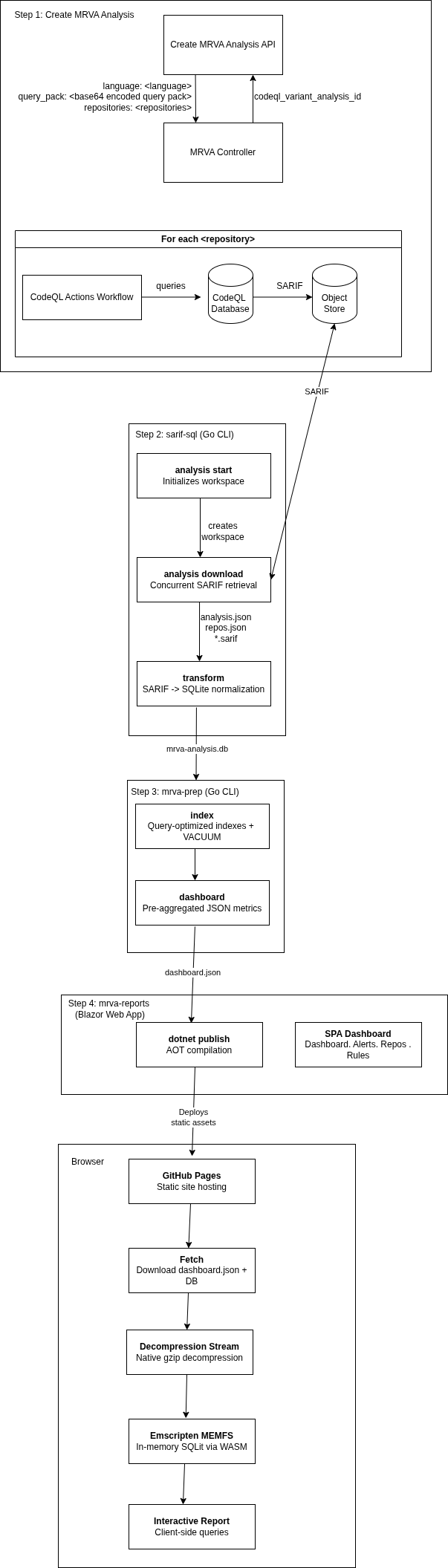
Five components automate the end-to-end MRVA lifecycle:
1. Create MRVA Analysis
Submit a CodeQL variant analysis via the Create a CodeQL variant analysis API. This triggers a GitHub Actions workflow that executes CodeQL queries against up to 1,000 repositories.
2. sarif-sql: SARIF-to-SQL Transform CLI
A Go CLI that downloads and transforms MRVA results:
download: Authenticates via PAT or GitHub App credentials, retrieves analysis metadata, and concurrently downloads SARIF artifact archives for all scanned repositories.transform: Parses SARIF files across a concurrent worker pool, extracts rules, alerts (with source/sink snippets, code flow steps, and fingerprints), and repository metadata, then writes the normalized output to a SQLite database (mrva-analysis.db).
The database contains four tables analysis, repository, rule, alert with foreign key relationships
3. mrva-prep : Data Model Optimization
A CLI application written in go that prepares the database for the reporting UI:
dashboard: Pre-aggregates analysis metrics for fast dashboard rendering.index: Adds query-optimized indexes to the database.compress: Creates a gzip-compressed copy of the SQLite database using maximum compression (gzip level 9) for local testing of the mrva-reports solution.
4. mrva-reports : Interactive Reporting Dashboard
A client-side Blazor WebAssembly application that renders the SQLite database as a static single-page dashboard, deployable to GitHub Pages with no backend:
Dashboard: KPI cards, severity distribution charts, repository coverage breakdowns, and ranked tables for top rules, repositories, and file paths.Alerts: Paginated, searchable data grid with expandable detail views showing code snippets, location metadata, and code flow information.Repositories: Filterable list of scanned repositories with alert counts and analysis status.Rules: Browsable list of triggered CodeQL rules with per-rule alert breakdowns.
At runtime, the gzip-compressed database is streamed to the browser, decompressed via native browser APIs, and loaded into an in-memory SQLite instance through Emscripten. All queries execute client-side.
5. GitHub Actions Orchestration
A GitHub Actions workflow chains steps 2–4 into a single workflow_dispatch trigger: it downloads SARIF artifacts via sarif-sql, prepares the database via mrva-prep, compiles the Blazor WebAssembly application with AOT, and publishes the static output to GitHub Pages. This CI/CD layer is the glue that turns the four standalone components into a fully automated end-to-end pipeline, from MRVA submission to a live, browsable report.
Architecture Diagram
Design Decisions
GitHub Pages over a hosted server
The report is deployed to GitHub Pages rather than a hosted server. This is a deliberate decision to eliminate the security overhead of standing up infrastructure. A self-hosted deployment would require securing the server, managing access control, and deciding on an identity provider — Active Directory, Okta, SAML, or something else — just to control who can view a report. All of which introduce operational burden and risk.
GitHub Pages sidesteps all of this by piggybacking on the repository’s existing permission model. Whoever has access to the deployment repository has access to the report. No additional authentication layer, no network policy, no secrets management for a reporting endpoint. The report is secured by the same GitHub access controls that already govern the repository, so there is nothing new to configure, audit, or maintain.
SQLite in the browser
All query execution happens client-side. The SQLite database is gzip-compressed, streamed to the browser, decompressed via the native DecompressionStream API, and loaded into an in-memory instance through Emscripten. This removes any need for a backend query service, and keeps the deployment model pure static hosting.
Limitations
- 1,000 repository cap - MRVA is limited to 1,000 repositories per analysis run. This is a GitHub API constraint, not a limitation of this project. Larger populations require splitting across multiple runs.
- Browser memory - The entire SQLite database is loaded into browser memory. Practical testing shows databases up to ~500 MB (uncompressed) load reliably on modern desktop browsers. Beyond that, tab crashes become likely depending on the device and available memory. For a typical MRVA run database sizes are well within this range (93MB).
- Static snapshot - The report is a point-in-time snapshot. There is no incremental update or live refresh - re-running the pipeline produces a new report that replaces the previous one.
Documentation Structure
This documentation is organized into two sections:
- User Manual: Installation, configuration, authentication, CLI usage, report generation, and deployment workflows.
- Developer Manual: Architecture, codebase structure, database schema, build system, contribution guidelines, and extension points.
User Manual
This manual covers the end-to-end workflow for running a Multi-Repository Variant Analysis (MRVA), transforming the results into a queryable database, and deploying an interactive report.
MRVA Workflow
- Create an MRVA analysis - submit a CodeQL query pack to the GitHub API, targeting up to 1,000 repositories in a single operation.
- Download and transform - use the
sarif-sqlCLI to retrieve SARIF artifacts and normalize them into a SQLite database. - Prepare the report - use the
mrva-prepCLI to add indexes, pre-aggregate dashboard metrics, and compress the database. - Deploy - publish an interactive Blazor WebAssembly dashboard to GitHub Pages via a GitHub Actions workflow.
- Navigate the report - explore alerts, repositories, rules, and severity breakdowns in the browser.
Each step can be run independently, but the typical flow proceeds in order. A fully automated CI/CD workflow is also provided that chains steps 2–4 into a single dispatch.
Workflow Overview
flowchart TD
    A["<b>Create CodeQL Variant Analysis</b><br/>GitHub API"] --> B["Executes query against<br/>up to 1,000 repositories"]

    B --> C["<b>sarif-sql CLI</b>"]
    C --> C1["analysis start → Create workspace directory"]
    C --> C2["analysis summary → Check analysis status"]
    C --> C3["analysis download → analysis.json + repos.json + *.sarif"]
    C3 --> C4["transform → mrva-analysis.db (SQLite)"]

    C4 --> D["<b>mrva-prep CLI</b>"]
    D --> D1["index → Query-optimized indexes"]
    D1 --> D2["dashboard → Pre-aggregated metrics (dashboard.json)"]
    D --> D3["compress → Gzip-compressed database (local dev only)"]

    D2 --> E["<b>Deploy</b><br/>GitHub Actions"]
    E --> E1["dotnet publish + GitHub Pages"]

    E1 --> F["<b>Interactive Report</b><br/>Browser"]
    F --> F1["Dashboard → KPI cards, charts, top-10 tables"]
    F --> F2["Alerts → Paginated, searchable alert grid"]
    F --> F3["Repositories → Repository list with alert counts"]
    F --> F4["Rules → Rule list with alert breakdowns"]

    style A fill:#2d333b,stroke:#444,color:#adbac7
    style C fill:#2d333b,stroke:#444,color:#adbac7
    style D fill:#2d333b,stroke:#444,color:#adbac7
    style E fill:#2d333b,stroke:#444,color:#adbac7
    style F fill:#2d333b,stroke:#444,color:#adbac7
Prerequisites
Before running the MRVA workflow, ensure the following tools and configurations are in place. Each section below covers a specific requirement.
Tools
| Tool | Version | Purpose |
|---|---|---|
| CodeQL CLI | Latest | Bundle query packs for the create analysis API call. |
| sarif-sql | Latest | Download SARIF artifacts and transform them to SQLite. |
| mrva-prep | Latest | Index, pre-aggregate, and compress the SQLite database. |
| jq | 1.6+ | Construct the JSON payload for the create analysis API call. |
| curl | 7.x+ | Submit the API request. |
| .NET SDK | 10.0 | Build the Blazor WebAssembly report (local development only). |
sarif-sql and mrva-prep are distributed as standalone binaries, so no Go toolchain is required.
Controller Repository
MRVA uses GitHub Actions to execute queries. A controller repository must exist to orchestrate the analysis. Requirements:
- The repository must contain at least one commit.
- No dedicated workflow file is required, GitHub creates one automatically.
Self-Hosted Runners (Optional)
Self-hosted runners are supported via the MRVA_RUNNER_OS action variable (not a secret) on the controller repository. The value is a JSON array mapping to the runs-on field:
["self-hosted", "some-label", "another-label"]
If this variable is not set, the analysis runs on GitHub-hosted runners.
CodeQL Database Availability
MRVA queries run against CodeQL databases stored on GitHub. A repository cannot participate in variant analysis until a valid CodeQL database exists for the target language. Each code scanning workflow run generates a fresh database snapshot per analyzed language, with the most recent version persisted automatically.
Large-scale MRVA is only feasible after CodeQL has been fully rolled out across the target repositories for the language under analysis.
Target Repository List
Prepare a JSON file listing the repositories to analyze. The file should contain an array of "owner/name" strings:
[
  "org/repo-one",
  "org/repo-two",
  "org/repo-three"
]
Save this as repos.json (or any filename, you will pass it as an argument). Alternatively, you can target entire organizations using the repository_owners field in the API request instead of listing individual repositories.
Authentication
A GitHub Personal Access Token (PAT) or GitHub App credentials are required. The token must have read access to:
- The controller repository used to orchestrate the analysis.
- All target repositories included in the analysis.
Personal Access Token
Pass the token via the --token flag:
sarif-sql analysis download \
  --analysis-id 22021 \
  --controller-repo org/controller \
  --directory ./analyses/22021-org-controller \
  --token "$GITHUB_TOKEN"
GitHub App
For automated or organizational workflows, a GitHub App provides fine-grained, scoped access without personal tokens. Pass the app ID and private key:
sarif-sql analysis download \
  --analysis-id 22021 \
  --controller-repo org/controller \
  --directory ./analyses/22021-org-controller \
  --app-id "12345" \
  --private-key "$(cat private-key.pem)"
The CLI handles the full authentication flow automatically:
- Generates a JWT from the app ID and private key.
- Discovers the installation ID for the controller repository.
- Obtains an installation access token.
- Refreshes the token transparently via a custom HTTP transport when it expires.
GitHub Enterprise Server
For GitHub Enterprise Server (GHES) deployments, override the API base URL with the --base-url flag:
sarif-sql analysis download \
  --analysis-id 22021 \
  --controller-repo org/controller \
  --directory ./analyses/22021-org-controller \
  --token "$GITHUB_TOKEN" \
  --base-url "https://github.example.com/api/v3"
The default is https://api.github.com. This flag applies to all analysis subcommands.
Creating an MRVA Analysis
A MRVA analysis is created by submitting a CodeQL query pack to the Create a CodeQL variant analysis API endpoint. This triggers a GitHub Actions workflow that executes the queries against the target repositories.
Step 1: Prepare the Query Pack
A CodeQL query pack bundles queries, query suites, optional libraries, and a codeql-pack.yml manifest. Install dependencies and create a distributable bundle:
codeql pack install path/to/query-pack
codeql pack bundle --output query-pack-bundle.tar.gz path/to/query-pack
You can read more about creating query packs in the GitHub documentation.
Step 2: Base64-Encode the Bundle
The API expects the query pack as a Base64-encoded string:
base64 -w 0 query-pack-bundle.tar.gz > query-pack-base64.txt
Step 3: Construct the Request Payload
The payload requires the target language, the encoded query pack, and a repository target:
| Field | Type | Required | Description |
|---|---|---|---|
language | string | Yes | Target language: javascript, typescript, python, java, cpp, csharp, go, ruby. |
query_pack | string (Base64) | Yes | Base64-encoded .tgz query pack. |
repositories | string[] | One of | Explicit list of repositories in owner/name format. |
repository_owners | string[] | One of | Organization handles. Targets all eligible repositories under each owner. |
repositories and repository_owners are mutually exclusive — use one or the other.
Build the JSON payload with jq:
jq -n \
  --arg language "go" \
  --rawfile query_pack query-pack-base64.txt \
  --slurpfile repositories repos.json \
  '{language: $language, query_pack: $query_pack, repositories: $repositories[0]}' \
  > payload.json
The payload is written to a file because the encoded query pack typically exceeds command-line argument limits.
Step 4: Submit the Request
curl -L \
  -X POST \
  -H "Accept: application/vnd.github+json" \
  -H "Authorization: Bearer ${GITHUB_TOKEN}" \
  -H "X-GitHub-Api-Version: 2026-03-10" \
  -H "Content-Type: application/json" \
  -d @payload.json \
  "https://api.github.com/repos/${CONTROLLER_REPO}/code-scanning/codeql/variant-analyses"
Replace ${CONTROLLER_REPO} with your controller repository in owner/name format.
Step 5: Note the Analysis ID
The API response includes an id field. This is the analysisId required by all subsequent steps:
{
  "id": 22021,
  "controller_repo": { ... },
  "query_language": "go",
  "status": "in_progress",
  ...
}
Record this value - you will pass it as --analysis-id to the sarif-sql and mrva-prep commands.
Complete Script
The following script combines all steps into a single executable:
#!/usr/bin/env bash
set -euo pipefail

usage() {
  echo "Usage: $0 -c <controller_repo> -l <language> -p <pack_dir> -r <repos_file>" >&2
  echo "  -c  Controller repository (owner/name)" >&2
  echo "  -l  CodeQL language" >&2
  echo "  -p  Query pack source directory" >&2
  echo "  -r  Path to repos.json" >&2
  exit 1
}

while getopts "c:l:p:r:" opt; do
  case "$opt" in
    c) CONTROLLER_REPO="$OPTARG" ;;
    l) LANGUAGE="$OPTARG" ;;
    p) PACK_DIR="$OPTARG" ;;
    r) REPOS_FILE="$OPTARG" ;;
    *) usage ;;
  esac
done

: "${CONTROLLER_REPO:?Missing -c <controller_repo>}"
: "${LANGUAGE:?Missing -l <language>}"
: "${PACK_DIR:?Missing -p <pack_dir>}"
: "${REPOS_FILE:?Missing -r <repos_file>}"

BUNDLE_OUTPUT="$(basename "$PACK_DIR")-bundle.tar.gz"
ENCODED_OUTPUT="$(basename "$PACK_DIR")-base64.txt"

SCRIPT_DIR="$(cd "$(dirname "${BASH_SOURCE[0]}")" && pwd)"
cd "$SCRIPT_DIR"

# Bundle query pack
echo "==> Installing pack dependencies..."
codeql pack install "$PACK_DIR"

echo "==> Bundling CodeQL pack..."
codeql pack bundle --output="$BUNDLE_OUTPUT" "$PACK_DIR"

echo "==> Base64-encoding bundle..."
base64 -w 0 "$BUNDLE_OUTPUT" > "$ENCODED_OUTPUT"

# Submit variant analysis
PAYLOAD=$(mktemp)
trap 'rm -f "$PAYLOAD"' EXIT

jq -n \
  --arg language "$LANGUAGE" \
  --rawfile query_pack "$SCRIPT_DIR/$ENCODED_OUTPUT" \
  --slurpfile repositories "$SCRIPT_DIR/$REPOS_FILE" \
  '{language: $language, query_pack: $query_pack, repositories: $repositories[0]}' \
  > "$PAYLOAD"

echo "==> Submitting variant analysis..."
curl -L \
  -X POST \
  -H "Accept: application/vnd.github+json" \
  -H "Authorization: Bearer ${GITHUB_TOKEN}" \
  -H "X-GitHub-Api-Version: 2026-03-10" \
  -H "Content-Type: application/json" \
  -d @"$PAYLOAD" \
  "https://api.github.com/repos/${CONTROLLER_REPO}/code-scanning/codeql/variant-analyses"
Usage:
export GITHUB_TOKEN="ghp_..."

./create-analysis.sh \
  -c "org/controller" \
  -l "go" \
  -p "./my-query-pack" \
  -r "./repos.json"
Example GitHub Actions Workflow
The workflow below automates the entire post-analysis pipeline: downloading SARIF artifacts, transforming them into a SQLite database, preparing dashboard metrics, building the Blazor WebAssembly report, and deploying it to GitHub Pages. It is triggered manually via workflow_dispatch and requires two inputs: the MRVA analysis ID and the controller repository.
Before using this workflow, ensure GitHub Pages is enabled on the deployment repository (Settings → Pages → Source: GitHub Actions) and a repository secret named TOKEN is configured with a PAT or GitHub App token that has read access to the controller and target repositories.
The Workflow Steps chapter provides a detailed breakdown of each step.
name: Deploy to GitHub Pages

on:
  workflow_dispatch:
    inputs:
      analysis-id:
        description: 'MRVA analysis ID'
        required: true
        type: string
      controller-repo:
        description: 'Controller repository (owner/name)'
        required: true
        type: string

permissions:
  contents: read
  pages: write
  id-token: write

concurrency:
  group: "pages"
  cancel-in-progress: false

env:
  DATA_DIR: mrva-reports/src/WebAssembly/wwwroot/data

jobs:
  build:
    runs-on: ubuntu-latest
    steps:
      - name: Checkout mrva-reports
        uses: actions/checkout@v4
        with:
          repository: ghas-projects/mrva-reports
          path: mrva-reports
          token: ${{ secrets.TOKEN }}

      - name: Set analysis directory
        run: |
          SANITIZED_REPO="${{ inputs.controller-repo }}"
          SANITIZED_REPO="${SANITIZED_REPO//\//-}"
          echo "ANALYSIS_DIR=analyses/${{ inputs.analysis-id }}-${SANITIZED_REPO}" >> "$GITHUB_ENV"

      # ── sarif-sql: download SARIF data and transform to SQLite ───────
      - name: Download sarif-sql CLI
        run: |
          gh release download --repo ghas-projects/sarif-sql \
            --pattern 'sarif-sql-linux-amd64' \
            --output sarif-sql
          chmod +x sarif-sql
        env:
          GH_TOKEN: ${{ secrets.GITHUB_TOKEN }}

      - name: sarif-sql analysis start
        run: |
          ./sarif-sql analysis start \
            --analysis-id ${{ inputs.analysis-id }} \
            --controller-repo ${{ inputs.controller-repo }} \
            --token ${{ secrets.TOKEN }}

      - name: sarif-sql analysis download
        run: |
          ./sarif-sql analysis download \
            --analysis-id ${{ inputs.analysis-id }} \
            --controller-repo ${{ inputs.controller-repo }} \
            --directory ${{ env.ANALYSIS_DIR }} \
            --token ${{ secrets.TOKEN }}

      - name: sarif-sql analysis transform
        run: |
          mkdir -p ${{ env.DATA_DIR }}
          ./sarif-sql transform \
            --analysis-id ${{ inputs.analysis-id }} \
            --controller-repo ${{ inputs.controller-repo }} \
            --sarif-directory ${{ env.ANALYSIS_DIR }} \
            --output ${{ env.DATA_DIR }}

      # ── mrva-prep: index, dashboard & compress ───────────────────────
      - name: Download mrva-prep CLI
        run: |
          gh release download --repo ghas-projects/mrva-prep \
            --pattern 'mrva-prep-linux-amd64' \
            --output mrva-prep
          chmod +x mrva-prep
        env:
          GH_TOKEN: ${{ secrets.GITHUB_TOKEN }}

      - name: mrva-prep index
        run: ./mrva-prep index --db ${{ env.DATA_DIR }}/mrva-analysis.db

      - name: mrva-prep dashboard
        run: ./mrva-prep dashboard --db ${{ env.DATA_DIR }}/mrva-analysis.db --output ${{ env.DATA_DIR }}

      # ── Build & publish Blazor WASM ──────────────────────────────────
      - name: Setup .NET
        uses: actions/setup-dotnet@v5
        with:
          dotnet-version: '10.0.x'

      - name: Install wasm-tools workload
        run: dotnet workload install wasm-tools

      - name: Restore dependencies
        run: dotnet restore mrva-reports/src/WebAssembly/WebAssembly.csproj

      - name: Publish
        run: dotnet publish mrva-reports/src/WebAssembly/WebAssembly.csproj -c Release -o release --nologo

      - name: Rewrite base href for GitHub Pages
        run: sed -i 's|<base href="/" />|<base href="/mrva-site/" />|g' release/wwwroot/index.html

      - name: Add .nojekyll file
        run: touch release/wwwroot/.nojekyll

      - name: Upload artifact
        uses: actions/upload-pages-artifact@v3
        with:
          path: release/wwwroot

  deploy:
    environment:
      name: github-pages
      url: ${{ steps.deployment.outputs.page_url }}
    runs-on: ubuntu-latest
    needs: build
    steps:
      - name: Deploy to GitHub Pages
        id: deployment
        uses: actions/deploy-pages@v4
Workflow Steps
This section breaks down each step of the GitHub Actions workflow from the Example GitHub Actions Workflow. Understanding what each step does helps with troubleshooting, customization, and running the pipeline manually.
Step 1: Checkout mrva-reports
- name: Checkout mrva-reports
  uses: actions/checkout@v4
  with:
    repository: ghas-projects/mrva-reports
    path: mrva-reports
    token: ${{ secrets.TOKEN }}
Clones the Blazor WebAssembly reporting application into the mrva-reports/ directory. The TOKEN secret must have read access to this repository.
Step 2: Set Analysis Directory
- name: Set analysis directory
  run: |
    SANITIZED_REPO="${{ inputs.controller-repo }}"
    SANITIZED_REPO="${SANITIZED_REPO//\//-}"
    echo "ANALYSIS_DIR=analyses/${{ inputs.analysis-id }}-${SANITIZED_REPO}" >> "$GITHUB_ENV"
Constructs a sanitized directory name from the analysis ID and controller repo (replacing / with -). This path is used by subsequent steps to store downloaded artifacts.
Step 3: Download and Run sarif-sql
- name: Download sarif-sql CLI
  run: |
    gh release download --repo ghas-projects/sarif-sql \
      --pattern 'sarif-sql-linux-amd64' \
      --output sarif-sql
    chmod +x sarif-sql
Downloads the sarif-sql binary from the latest release. Then three commands run in sequence:
analysis start
Creates the local workspace directory structure at ./analyses/{id}-{controller}/.
analysis download
Authenticates with the GitHub API, fetches the analysis summary, and concurrently downloads SARIF artifacts for all repositories with analysis_status: succeeded. Outputs analysis.json, repos.json, and individual .sarif files.
transform
Parses all SARIF files and writes the normalized data to mrva-analysis.db in the Blazor app’s wwwroot/data/ directory.
Step 4: Download and Run mrva-prep
- name: Download mrva-prep CLI
  run: |
    gh release download --repo ghas-projects/mrva-prep \
      --pattern 'mrva-prep-linux-amd64' \
      --output mrva-prep
    chmod +x mrva-prep
Downloads the mrva-prep binary from the latest release. Then two commands run:
index
Creates query-optimized indexes on the alert table (rule_row_id, repository_row_id), runs ANALYZE to update planner statistics, and VACUUM to compact the database.
dashboard
Pre-aggregates dashboard metrics (scalar counts, severity distribution, top 10 rules/repos/file paths) into dashboard.json. This file enables the report’s instant first-paint while the full database loads in the background.
Step 5: Build Blazor WASM Application
- name: Setup .NET
  uses: actions/setup-dotnet@v5
  with:
    dotnet-version: '10.0.x'

- name: Install wasm-tools workload
  run: dotnet workload install wasm-tools

- name: Restore dependencies
  run: dotnet restore mrva-reports/src/WebAssembly/WebAssembly.csproj

- name: Publish
  run: dotnet publish mrva-reports/src/WebAssembly/WebAssembly.csproj -c Release -o release --nologo
Installs .NET 10.0, the WebAssembly AOT compilation workload, restores NuGet packages, and publishes the Blazor WASM app with AOT compilation. A custom MSBuild target (CompressDatabase) automatically gzip-compresses the SQLite database at level 9 and removes the uncompressed original.
Step 6: Configure for GitHub Pages
- name: Rewrite base href for GitHub Pages
  run: sed -i 's|<base href="/" />|<base href="/mrva-site/" />|g' release/wwwroot/index.html

- name: Add .nojekyll file
  run: touch release/wwwroot/.nojekyll
Rewrites the <base href> tag to match the GitHub Pages path prefix. The .nojekyll file prevents GitHub Pages from processing files through Jekyll, which would break the Blazor app’s static assets.
Step 7: Deploy
- name: Upload artifact
  uses: actions/upload-pages-artifact@v3
  with:
    path: release/wwwroot

- name: Deploy to GitHub Pages
  uses: actions/deploy-pages@v4
Uploads the published static site as a Pages artifact and deploys it. The report is available at https://<owner>.github.io/<repo>/ once deployment completes.
Navigating the Report
The MRVA report is a single-page application that runs entirely in the browser. It uses a two-phase loading strategy: the dashboard renders instantly from a lightweight JSON file while the full SQLite database downloads in the background. Once the database loads, the Alerts, Repositories, and Rules pages become available.
Dashboard (/)
The landing page. Displays the full analysis overview using pre-aggregated metrics.
Analysis Metadata
A summary card showing the analysis ID, date, start/end times, tool name, controller repository, query language, state, status, failure reason (if any), and the Actions workflow run ID.
Repository Breakdown
Clickable cards showing counts for each repository category:
| Card | Description | Click Action |
|---|---|---|
| Total | All repositories in the analysis. | Navigate to /repo. |
| Scanned | Repositories successfully scanned. | Navigate to /repo?status=succeeded. |
| Skipped | Repositories skipped due to access mismatch. | Navigate to /repo?status=access_mismatch. |
| Not Found | Repositories not found. | Navigate to /repo?status=not_found. |
| No CodeQL DB | Repositories without a CodeQL database. | Navigate to /repo?status=no_codeql_db. |
| Over Limit | Repositories exceeding the analysis limit. | Navigate to /repo?status=over_limit. |
Summary Cards
Three cards showing total alerts, repositories, and rules. Each card navigates to its respective list page when clicked.
Severity Pie Chart
Alert distribution by severity level. Clicking a slice navigates to the alerts page filtered by that severity.
Top 10 Tables
- Top Rules - Rules ranked by alert count. Clicking a row navigates to alerts filtered by that rule.
- Top Repositories - Repositories ranked by alert count.
- Top File Paths - File path / repository combinations ranked by alert count.
Coverage Charts
Two pie charts showing:
- Repository coverage - Proportion of repositories with and without alerts.
- Rule coverage - Proportion of rules with and without alerts.
Alerts (/alert)
A server-side paginated data grid displaying all alerts. This page waits for the full database to finish loading before rendering.
Columns
| Column | Description |
|---|---|
| Rule | CodeQL rule identifier. |
| Kind | Rule kind (e.g., problem, path-problem). |
| Repository | Repository full name. |
| Severity | Alert severity level. |
| File Path | Source file path where the alert was found. |
Search
Free-text search with 800 ms debounce. Searches across rule ID, rule kind, repository name, severity, file path, and message columns.
Alert Detail
Click any row to open a detail dialog showing:
- Full file location (path, line/column ranges).
- Alert message.
- Code snippets (source, sink, context).
- Code flow step count.
- Result fingerprint.
Query Parameters
| Parameter | Description | Example |
|---|---|---|
search | Pre-fill the search box. | /alert?search=sql-injection |
Repositories (/repo)
A client-side data grid displaying all repositories with alert counts.
Columns
| Column | Description |
|---|---|
| Name | Repository full name. |
| URL | Link to the repository on GitHub. |
| Status | Analysis status (succeeded, access_mismatch, not_found, no_codeql_db, over_limit). |
| Alerts | Number of alerts found in the repository. |
Search
Client-side quick filter matching across all visible columns.
Query Parameters
| Parameter | Description | Example |
|---|---|---|
hasAlerts | Filter to repositories with (true) or without (false) alerts. | /repo?hasAlerts=true |
status | Filter by analysis status. | /repo?status=succeeded |
Rules (/rule)
A client-side data grid displaying all rules with alert counts.
Columns
| Column | Description |
|---|---|
| ID | CodeQL rule identifier. |
| Description | Rule description. |
| Severity | Rule severity level. |
| Kind | Rule kind. |
| Property Tags | Comma-separated rule tags. |
| Alerts | Number of alerts triggered by this rule. |
Search
Client-side quick filter matching across all fields including property tags.
Query Parameters
| Parameter | Description | Example |
|---|---|---|
hasAlerts | Filter to rules with (true) or without (false) alerts. | /rule?hasAlerts=true |
Rule Detail
Double-click a row to navigate to the rule detail page with a full breakdown of alerts for that rule.
CLI Reference
Consolidated reference for all CLI tools in the MRVA workflow.
sarif-sql
Go CLI for downloading and transforming MRVA results into a SQLite database.
Global Flags
| Flag | Required | Description |
|---|---|---|
--analysis-id | Yes | MRVA analysis ID. |
--controller-repo | Yes | Controller repository (owner/name). |
Authentication Flags
Used by all analysis subcommands. The two methods are mutually exclusive. You can either provide a token or an app-id and private key.
| Flag | Description |
|---|---|
--token | GitHub Personal Access Token. |
--app-id | GitHub App ID. |
--private-key | GitHub App private key (PEM content). |
--base-url | GitHub API base URL (default: https://api.github.com). For GHES. |
Commands
analysis start
Initialize the local workspace directory.
sarif-sql analysis start \
  --analysis-id <id> \
  --controller-repo <owner/name> \
  --token "$GITHUB_TOKEN"
analysis summary
Fetch analysis status and generate a markdown report.
sarif-sql analysis summary \
  --analysis-id <id> \
  --controller-repo <owner/name> \
  --token "$GITHUB_TOKEN"
analysis download
Download SARIF artifacts for all scanned repositories.
sarif-sql analysis download \
  --analysis-id <id> \
  --controller-repo <owner/name> \
  --directory <path> \
  --token "$GITHUB_TOKEN"
| Flag | Required | Description |
|---|---|---|
--directory | Yes | Output directory for downloaded artifacts. |
transform
Parse SARIF files and write a normalized SQLite database.
sarif-sql transform \
  --analysis-id <id> \
  --controller-repo <owner/name> \
  --sarif-directory <path> \
  --output <path>
| Flag | Required | Default | Description |
|---|---|---|---|
--sarif-directory | Yes | — | Directory containing SARIF files, analysis.json, and repos.json. |
--output | No | ./output | Output directory for mrva-analysis.db. |
mrva-prep
Go CLI for optimizing the SQLite database for the reporting UI.
Global Flags
| Flag | Default | Description |
|---|---|---|
--db, -d | mrva.db | Path to the SQLite database. |
Commands
index
Create query-optimized indexes, run ANALYZE, and VACUUM.
mrva-prep index --db <path>
dashboard
Pre-aggregate dashboard metrics to dashboard.json.
mrva-prep dashboard --db <path> --output <dir>
| Flag | Default | Description |
|---|---|---|
--output, -o | . | Directory to write dashboard.json. |
compress
Gzip-compress the database (level 9). Local development only.
mrva-prep compress --db <path>
all
Run index → dashboard → compress in sequence.
mrva-prep all --db <path> --output <dir>
| Flag | Default | Description |
|---|---|---|
--output, -o | . | Directory to write dashboard.json. |
Introduction
This section documents the architecture, design decisions, and internals of each component in the MRVA pipeline. It is intended for developers who want to understand, modify, or extend the system. If you only need to run the tools and generate reports, see the User Manual.
Chapters
Methodology
Describes the four-stage data pipeline: Raw → Curated → Unified → Optimized. Each stage defines the shape and purpose of the data as it moves from SARIF JSON to a query-ready SQLite database.
Implementation
Documents the four components that realize the pipeline:
- Create MRVA Analysis - Submitting a CodeQL variant analysis via the GitHub Code Scanning REST API. Covers controller repository requirements, runner configuration, query pack bundling, and the API request/response schema.
- sarif-sql - A Go CLI that downloads SARIF artifacts and transforms them into a normalized SQLite database. Documents commands, global flags, authentication modes, and the database schema.
- mrva-prep - A Go CLI that adds query-optimized indexes, extracts pre-aggregated dashboard metrics to
dashboard.json, and gzip-compresses the database. Documents commands, flags, and aggregation queries. - mrva-reports - A Blazor WebAssembly application that renders the SQLite database as a static single-page dashboard in the browser. Covers the solution structure, technology stack, two-phase loading architecture, JavaScript interop, and SPA routing on GitHub Pages.
Methodology
MRVA reporting is fundamentally a data problem. SARIF artifacts are unstructured, per-repository JSON documents that must be transformed into a queryable, presentation-ready format. The workflow follows four stages:
flowchart LR
    A["<b>Raw</b><br/>SARIF JSON<br/>GitHub API"] -->|sarif-sql| B["<b>Curated</b><br/>Typed fields<br/>Conformed dates"]
    B -->|sarif-sql| C["<b>Unified</b><br/>Normalized schema<br/>mrva-analysis.db"]
    C -->|mrva-prep| D["<b>Optimized</b><br/>Pre-aggregated<br/>Indexed"]
1. Raw
Input: SARIF JSON files and analysis metadata downloaded from the GitHub Code Scanning API. Each file is an independent, deeply nested document with no cross-repository linkage. This is the unprocessed source data.
2. Curated
The sarif-sql CLI parses each SARIF file and extracts typed fields: rule identifiers, severity levels, message strings, file paths, region coordinates, code flow steps, and fingerprints. Date values are conformed to a consistent format. Nested SARIF structures (runs → results → locations → code flows) are flattened into discrete records with explicit relationships.
3. Unified
Curated records are mapped to a normalized relational schema and written to a SQLite database (mrva-analysis.db). Four tables analysis, repository, rule, alert establish foreign key relationships that enable cross-repository queries. Data from all scanned repositories is consolidated into a single database, providing the unified query surface.
4. Optimized
The mrva-prep CLI restructures the database for client-side rendering performance. Pre-aggregated metrics (alert counts by severity, top rules, top repositories, file path distributions) are computed and stored. Query-optimized indexes are added to support the access patterns required by the reporting dashboard. The result is a database that can be loaded into an in-memory WASM SQLite instance and queried without perceptible latency.
Implementation
Four components implement the data pipeline described in the Methodology chapter. Each is a standalone tool with its own repository, build, and release lifecycle. The GitHub Actions workflow that chains them together is documented in the User Manual.
| Component | Language | Pipeline Stage | Description |
|---|---|---|---|
| Create MRVA Analysis | Bash / API | Raw | Submits a CodeQL variant analysis via the GitHub Code Scanning REST API. |
| sarif-sql | Go | Curated → Unified | Downloads SARIF artifacts and transforms them into a normalized SQLite database. |
| mrva-prep | Go | Optimized | Adds indexes, pre-aggregates dashboard metrics, and compresses the database. |
| mrva-reports | C# / Blazor WASM | Presentation | Renders the SQLite database as a static single-page dashboard in the browser. |
Create MRVA Analysis
In this workflow, the main mechanism for creating a MRVA analysis is via the Create a CodeQL variant analysis API. This will produce the raw data.
Prerequisites
CodeQL Database Availability
MRVA queries run against CodeQL databases stored on GitHub. A repository cannot participate in variant analysis until a valid CodeQL database exists for the target language. Each code scanning workflow run generates a fresh database snapshot per analyzed language, with the most recent version persisted automatically. Large-scale MRVA is only feasible after CodeQL has been fully rolled out across the target repositories for the language under analysis.
Controller Repository
MRVA uses GitHub Actions to execute queries. No dedicated workflow file is required, but a controller repository must exist to orchestrate the analysis. The controller repository must contain at least one commit.
Runner Configuration
Self-hosted runners are supported via the MRVA_RUNNER_OS action variable (not a secret) on the controller repository. The value is a JSON array mapping to the runs-on field:
["self-hosted", "some-label", "another-label"]
Query Packs
A CodeQL query pack is a distributable unit that bundles queries, query suites, optional libraries, and a manifest (codeql-pack.yml). Packs are versioned, portable, and define dependencies on other packs. The query_pack field in the API request specifies which queries MRVA executes. You can read more about creating CodeQL packs here.
API
Request Body
| Field | Type | Required | Description |
|---|---|---|---|
language | string | Yes | Target language (javascript, typescript, python, java, cpp, csharp, go, ruby). Must match the CodeQL database language. One database exists per language per repository. |
query_pack | string (Base64) | Yes | Base64-encoded CodeQL query pack tarball (.tgz). |
repositories | string[] | One of | Explicit repository list in owner/name format. Mutually exclusive with repository_owners. |
repository_owners | string[] | One of | Organization handles. Targets all eligible repositories under each owner. Mutually exclusive with repositories. |
Bundle, Encode, and Submit
The following example script bundles a CodeQL query pack, Base64-encodes it, constructs the JSON payload, and submits the variant analysis request. The payload is written to a temporary file because the encoded query pack exceeds command-line argument limits. repos.json contains a JSON array of "owner/name" strings. GITHUB_TOKEN must be set as an environment variable. There are multiple ways to achieve this, the purpose of this example is to demonstrate some of the considerations that should be made when calling the create endpoint, particularly when exceeding length limits.
#!/usr/bin/env bash
set -euo pipefail

usage() {
  echo "Usage: $0 -c <controller_repo> -l <language> -p <pack_dir> -r <repos_file>" >&2
  echo "  -c  Controller repository (owner/name)" >&2
  echo "  -l  CodeQL language" >&2
  echo "  -p  Query pack source directory" >&2
  echo "  -r  Path to repos.json" >&2
  exit 1
}

while getopts "c:l:p:r:" opt; do
  case "$opt" in
    c) CONTROLLER_REPO="$OPTARG" ;;
    l) LANGUAGE="$OPTARG" ;;
    p) PACK_DIR="$OPTARG" ;;
    r) REPOS_FILE="$OPTARG" ;;
    *) usage ;;
  esac
done

: "${CONTROLLER_REPO:?Missing -c <controller_repo>}"
: "${LANGUAGE:?Missing -l <language>}"
: "${PACK_DIR:?Missing -p <pack_dir>}"
: "${REPOS_FILE:?Missing -r <repos_file>}"

BUNDLE_OUTPUT="$(basename "$PACK_DIR")-bundle.tar.gz"
ENCODED_OUTPUT="$(basename "$PACK_DIR")-base64.txt"

SCRIPT_DIR="$(cd "$(dirname "${BASH_SOURCE[0]}")" && pwd)"
cd "$SCRIPT_DIR"

if ! command -v codeql &>/dev/null; then
  echo "Error: 'codeql' CLI not found in PATH." >&2
  exit 1
fi

# Bundle query pack
echo "==> Installing pack dependencies..."
codeql pack install "$PACK_DIR"

echo "==> Bundling CodeQL pack..."
codeql pack bundle \
  --output="$BUNDLE_OUTPUT" \
  "$PACK_DIR"

echo "==> Base64-encoding bundle..."
base64 -w 0 "$BUNDLE_OUTPUT" > "$ENCODED_OUTPUT"

BYTE_SIZE=$(wc -c < "$BUNDLE_OUTPUT")
ENCODED_SIZE=$(wc -c < "$ENCODED_OUTPUT")
echo "  Bundle:  $BUNDLE_OUTPUT ($BYTE_SIZE bytes)"
echo "  Base64:  $ENCODED_OUTPUT ($ENCODED_SIZE bytes)"

# Submit variant analysis
PAYLOAD=$(mktemp)
trap 'rm -f "$PAYLOAD"' EXIT

jq -n \
  --arg language "$LANGUAGE" \
  --rawfile query_pack "$SCRIPT_DIR/$ENCODED_OUTPUT" \
  --slurpfile repositories "$SCRIPT_DIR/$REPOS_FILE" \
  '{language: $language, query_pack: $query_pack, repositories: $repositories[0]}' \
  > "$PAYLOAD"

echo "==> Submitting variant analysis..."
curl -L \
  -X POST \
  -H "Accept: application/vnd.github+json" \
  -H "Authorization: Bearer ${GITHUB_TOKEN}" \
  -H "X-GitHub-Api-Version: 2026-03-10" \
  -H "Content-Type: application/json" \
  -d @"$PAYLOAD" \
  "https://api.github.com/repos/${CONTROLLER_REPO}/code-scanning/codeql/variant-analyses"
The following demonstrates the full workflow: executing the scripts above with the required flags, bundling and encoding the query pack, and submitting the variant analysis request to the GitHub API. Note the id field in the API response as it is required in subsequent steps of this workflow. See the official documentation for full response details.
sarif-sql
sarif-sql is a Go CLI that handles the curated and unified stages of the MRVA workflow. It authenticates against the GitHub API, downloads SARIF artifacts from a completed MRVA analysis, and transforms them into a normalized SQLite database.
The CLI is built with Cobra, providing built-in help text, usage documentation, and flag validation for every command and subcommand. Run any command with --help for detailed usage.
The binary name is sarif-sql. The module path is github.com/advanced-security/sarif-sql.
Global Flags
All commands require these persistent flags:
| Flag | Required | Description |
|---|---|---|
--analysis-id | Yes | The MRVA analysis ID (from the create API response). |
--controller-repo | Yes | Controller repository in owner/name format. |
Commands
Authentication
The analysis subcommands require GitHub API authentication. Two methods are supported - mutually exclusive:
Personal Access Token:
--token "$GITHUB_TOKEN"
GitHub App:
--app-id "12345" --private-key "$(cat private-key.pem)"
When using GitHub App authentication, the CLI generates a JWT, discovers the installation ID, and obtains an installation access token. The token is refreshed transparently via a custom HTTP transport.
An optional --base-url flag overrides the GitHub API base URL (default: https://api.github.com) for GitHub Enterprise Server deployments.
analysis start
Initializes the local directory structure for an analysis run. Creates the workspace at ./analyses/{analysisId}-{controllerRepo}/ where the controller repo name has / replaced with -.
sarif-sql analysis start \
--analysis-id 22011 \
--controller-repo mrva-security-demo/mrva-controller \
--token "$GITHUB_TOKEN"
analysis summary
Fetches the current state of the analysis from the GitHub API and generates a markdown status report. Use this to check whether the analysis has completed before downloading artifacts.
sarif-sql analysis summary \
--analysis-id 22011 \
--controller-repo mrva-security-demo/mrva-controller \
--token "$GITHUB_TOKEN"
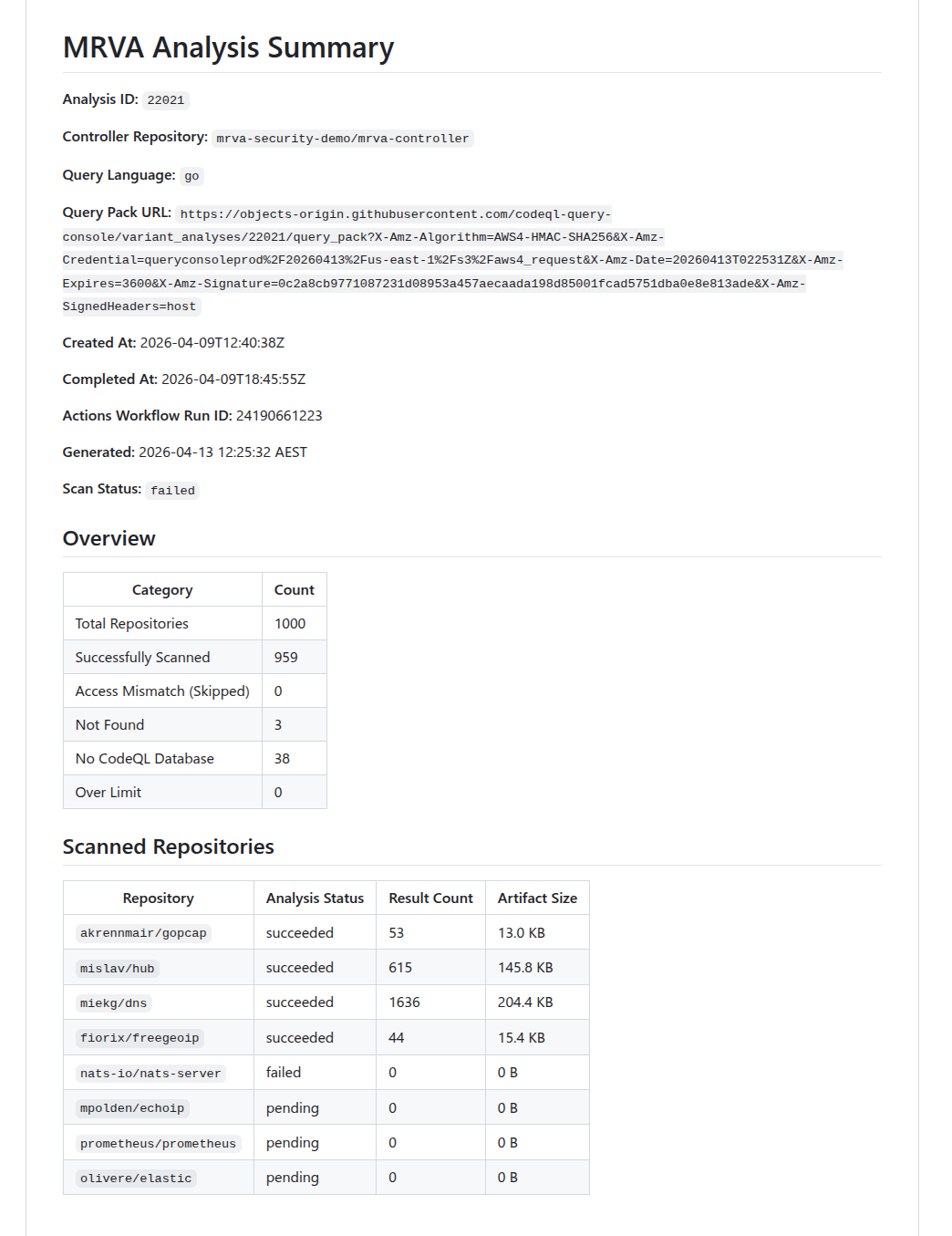
The report includes per-repository status (succeeded, pending, failed, canceled), result counts, artifact sizes, and counts for skipped, not found, no CodeQL DB, and over-limit repositories.
Below is an snippet of the report that was generated from running the command above.
Summary Report
analysis download
Downloads SARIF artifacts for all scanned repositories in the analysis. Fetches the analysis summary, retrieves the artifact URL for each repository, downloads the zip archives concurrently, extracts the .sarif files, and removes the zip files. Also writes two metadata files: analysis.json and repos.json. They hold metadata mapped from the summary API response. Only repositories with analysis_status: succeeded produce downloadable artifacts. Repositories that failed or were skipped are recorded in repos.json but no artifact download is attempted. The --directory flag should be the folder created in the sarif-sql analysis start command. This collects all the raw data for the analysis and puts it in a central location for subsequent steps.
sarif-sql analysis download \
--analysis-id 22021 \
--controller-repo mrva-security-demo/mrva-controller \
--directory ./analyses/22021-mrva-security-demo-mrva-controller \
--token "$GITHUB_TOKEN"
| Flag | Required | Description |
|---|---|---|
--directory | Yes | Output directory for downloaded artifacts. |
Concurrency
Worker count is calculated dynamically using the following steps:
- Start with
CPU count × 5- the 5× multiplier accounts for I/O-bound work where goroutines spend most of their time blocked on API responses, allowing other goroutines to run. - Cap at the number of repositories - never spawn more workers than there are tasks.
- Cap at 50 - hard upper bound to avoid resource exhaustion and respect GitHub API rate limits.
- Floor at 1 - ensure at least one worker is always spawned.
For example, on an 8-core machine with 200 repositories: min(min(8 × 5, 200), 50) = 40 workers. On a 16-core machine: min(min(16 × 5, 200), 50) = 50 workers (hits the cap).
Each worker fetches per-repository status (to obtain the artifact URL), downloads the zip, and extracts the SARIF file.
Benchmarks
Downloading 959 repositories from an analysis. Benchmarked using hyperfine (local) and GitHub Actions runner logs (CI).
| Local | GitHub Actions | |
|---|---|---|
| Wall-clock | 57.660s ± 5.482s (mean, 3 runs) | ~23s |
| Min / Max | 51.343s / 61.160s | — |
| User CPU | 7.070s | — |
| System CPU | 3.606s | — |
| Workers | 50 (capped) | 20 (4 vCPUs × 5) |
| CPU | Intel Core Ultra 9 185H (22 threads) | 4 vCPUs |
| RAM | 64 GB | 16 GB |
| OS | Linux | Ubuntu 24.04 |
| Region | Local (Australia) | Azure West US 3 |
The ~47s gap between CPU time (~10.7s) and wall-clock time (~57.7s) on the local machine confirms the download is heavily network I/O-bound. The Actions runner completes 2.5× faster despite fewer CPUs and workers, likely due to lower network latency between the Azure-hosted runner and GitHub’s artifact storage on AWS S3 (us-east-1).
transform
Parses all SARIF files in a directory and writes the normalized data to a SQLite database (mrva-analysis.db). This is the core of the curated to unified pipeline stage.
sarif-sql transform \
--analysis-id 22021 \
--controller-repo mrva-security-demo/mrva-controller \
--sarif-directory ./analyses/22021-mrva-security-demo-mrva-controller \
--output ../mrva-reports/src/WebAssembly/wwwroot/data/
| Flag | Required | Default | Description |
|---|---|---|---|
--sarif-directory | Yes | — | Path to the directory containing SARIF files, analysis.json, and repos.json. |
--output | No | ./output | Output directory for the SQLite database. |
Overview
The transform command is where the raw SARIF data produced by the download step is curated into typed, structured records and then unified into a single normalized SQLite database. This corresponds to the Raw → Curated → Unified stages described in the methodology. The process has three phases:
- Load metadata: reads
analysis.jsonandrepos.jsonfrom the SARIF directory (both written during the download phase) to establish the analysis context and the full list of repositories. - Parse and curate (Raw → Curated): scans the directory for
.sariffiles, pushes all filenames into a fully-buffered channel, and spawns a worker pool using the same sizing formula as the download step (min(CPU×5, fileCount, 50), floor 1). Each worker pulls filenames from the channel, parses the raw SARIF JSON, extracts typed fields, flattens nested structures into discrete records, and feeds the curated data into a shared result collector. - Write to SQLite (Curated → Unified): once all workers finish, the curated records are mapped to a normalized relational schema and written to a fresh SQLite database in a single atomic transaction.
The following sections describe each component in detail, following the order data flows through the system.
Result Collection
As workers parse SARIF files in parallel, they need a central place to deposit their curated output. The ResultCollector struct serves this role. It holds the typed, flattened records that workers produce from raw SARIF JSON. It is initialized before workers start and uses fine-grained synchronization to allow safe concurrent writes without becoming a bottleneck:
| Field | Type | Sync Primitive | Purpose |
|---|---|---|---|
Alerts | []*Alert | sync.Mutex | Append-only alert collection |
Repositories | map[string]*SQLRepository | sync.RWMutex | Repository lookup (pre-populated from repos.json) |
Rules | map[string]*Rule | sync.RWMutex | Deduplicated rule registry (written by workers) |
alertCounter | int64 | sync/atomic | Lock-free unique alert ID generation |
ruleCounter | int64 | sync/atomic | Lock-free unique rule ID generation |
The repository map is read-only from the workers’ perspective. It is fully populated before any worker starts. Rules and alerts, on the other hand, are written concurrently and require synchronization as described in the next section.
Worker Processing
Each worker pulls filenames from the shared channel and processes them independently. For every SARIF file, a worker performs the following steps at a high level:
- Read and parse - the file is read and unmarshalled into a struct.
- Repository resolution - the worker determines which repository the file belongs. If no provenance metadata exists, it falls back to using the raw SARIF filename as the lookup key.
- Rule extraction - rules are deduplicated across workers using a double-checked locking pattern: first, an
RLockchecks whether the rule ID already exists in the shared map. If it does not, the worker upgrades to a fullLockand re-checks (another worker may have inserted the rule in the meantime). Only then does it insert the rule, usingatomic.AddInt64to assign a globally unique numeric row ID. This ensures each CodeQL rule maps to exactly one ID regardless of how many SARIF files reference it. - Alert extraction - alert IDs are generated atomically. Each alert resolves its rule foreign key first from a local rule cache (fast path, no locking) and falls back to the shared
Rulesmap with anRLockif the local cache misses. The worker also captures file path and region coordinates to extract source/sink snippets. - Batch append - once all alerts for a SARIF file are built, they are appended to the shared collection in a single lock acquisition per file rather than once per alert, minimizing lock contention.
If a file cannot be read or parsed, the error is logged and the worker moves on to the next file. A single malformed SARIF file does not abort the entire run.
SQLite Write
After all workers finish, the curated records held in the ResultCollector are unified into a SQLite database. The database is always created fresh - the existing file is removed before sql.Open is called. The driver is modernc.org/sqlite, a pure-Go implementation that requires no CGO dependency. Two pragmas are set on connection: journal_mode=WAL and foreign_keys=ON.
All data is written in a single atomic transaction:
BEGIN
  INSERT INTO analysis       (1 row, direct exec)
  INSERT INTO repository     (N rows, prepared statement)
  INSERT INTO rule           (M rows, prepared statement)
  INSERT INTO alert          (K rows, prepared statement)
COMMIT
This is an all-or-nothing operation: if any insert fails, a deferred tx.Rollback() fires and the database remains empty. Either the complete analysis lands or nothing does.
Benchmarks
Transforming 959 SARIF files into a single SQLite database. Benchmarked using hyperfine (local) and GitHub Actions runner logs (CI).
| Local | GitHub Actions | |
|---|---|---|
| Wall-clock | 17.351s ± 0.612s (mean, 3 runs) | ~67s |
| Min / Max | 16.732s / 17.956s | — |
| User CPU | 131.352s | — |
| System CPU | 9.398s | — |
| Workers | 20 | 20 (4 vCPUs × 5) |
| CPU | Intel Core Ultra 9 185H (22 threads) | 4 vCPUs |
| RAM | 64 GB | 16 GB |
| OS | Linux | Ubuntu 24.04 |
| Region | Local (Australia) | Azure West US 3 |
The user CPU time (~131s) being ~7.5× the wall-clock time (~17s) on the local machine confirms the transform is effectively parallelised across available cores. The workload is CPU-bound, parsing SARIF JSON and inserting into SQLite. rather than I/O-bound. The Actions runner takes ~4× longer, reflecting the difference between 22 hardware threads and 4 vCPUs for a compute-heavy workload.
Database Schema
The output database mrva-analysis.db contains four tables with foreign key relationships:
erDiagram
    analysis {
        INTEGER row_id PK
    }

    repository {
        INTEGER row_id PK
        TEXT analysis_id FK
    }

    rule {
        INTEGER row_id PK
    }

    alert {
        INTEGER row_id PK
        INTEGER repository_row_id FK
        INTEGER rule_row_id FK
    }

    analysis ||--|{ repository : ""
    repository ||--o{ alert : ""
    rule ||--|{ alert : ""
analysis
| Column | Type | Source |
|---|---|---|
row_id | INTEGER PK | Auto-generated sequential counter (atomic.AddInt64). |
tool_name | TEXT | Hardcoded "CodeQL". |
tool_version | TEXT | runs[0].tool.driver.semanticVersion (nullable). |
analysis_id | TEXT | CLI flag --analysis-id. |
controller_repo | TEXT | CLI flag --controller-repo. |
date | TEXT | time.Now() at transformation time |
state | TEXT | Summary API response .status. |
query_language | TEXT | Summary API response .query_language. |
created_at | TEXT | Summary API response .created_at. |
completed_at | TEXT | Summary API response .completed_at (nullable). |
status | TEXT | Summary API response .status. |
failure_reason | TEXT | Summary API response .failure_reason (nullable). |
scanned_repos_count | INTEGER | len(summary.scanned_repositories). |
skipped_repos_count | INTEGER | summary.skipped_repositories.access_mismatch_repos.repository_count. |
not_found_repos_count | INTEGER | summary.skipped_repositories.not_found_repos.repository_count. |
no_codeql_db_repos_count | INTEGER | summary.skipped_repositories.no_codeql_db_repos.repository_count. |
over_limit_repos_count | INTEGER | summary.skipped_repositories.over_limit_repos.repository_count. |
actions_workflow_run_id | INTEGER | Summary API response .actions_workflow_run_id. |
total_repos_count | INTEGER | Computed sum of all repository category counts. |
repository
| Column | Type | Source |
|---|---|---|
row_id | INTEGER PK | Auto-generated sequential counter (atomic.AddInt64). |
repository_full_name | TEXT | Summary API response .scanned_repositories[].repository.full_name or skipped repository name. |
repository_url | TEXT | Derived: "https://github.com/" + full_name. |
analysis_status | TEXT | scanned_repositories[].analysis_status, or "access_mismatch", "not_found", "no_codeql_db", "over_limit" for skipped repos. |
result_count | INTEGER | scanned_repositories[].result_count (nullable — only scanned repos). |
artifact_size_in_bytes | INTEGER | scanned_repositories[].artifact_size_in_bytes (nullable;only scanned repos). |
analysis_id | TEXT | CLI flag --analysis-id. |
rule
| Column | Type | Source |
|---|---|---|
row_id | INTEGER PK | Auto-generated sequential counter (atomic.AddInt64), deduplicated across workers via double-checked locking. |
id | TEXT | runs[].tool.driver.rules[].id. |
rule_name | TEXT | runs[].tool.driver.rules[].name. |
rule_description | TEXT | runs[].tool.driver.rules[].properties.description (nullable). |
property_tags | TEXT | runs[].tool.driver.rules[].properties.tags - joined with , (nullable). |
kind | TEXT | runs[].tool.driver.rules[].properties.kind. |
severity_level | TEXT | runs[].tool.driver.rules[].properties["problem.severity"] (nullable). |
alert
| Column | Type | Source |
|---|---|---|
row_id | INTEGER PK | Auto-generated sequential counter (atomic.AddInt64). |
file_path | TEXT | runs[].results[].locations[0].physicalLocation.artifactLocation.uri. |
start_line | INTEGER | runs[].results[].locations[0].physicalLocation.region.startLine (nullable). |
start_column | INTEGER | runs[].results[].locations[0].physicalLocation.region.startColumn (nullable). |
end_line | INTEGER | runs[].results[].locations[0].physicalLocation.region.endLine, falls back to startLine (nullable). |
end_column | INTEGER | runs[].results[].locations[0].physicalLocation.region.endColumn (nullable). |
code_snippet_source | TEXT | runs[].results[].codeFlows[0].threadFlows[0].locations[] - snippet from the location where taxa[0].properties["CodeQL/DataflowRole"] is "source" (nullable). |
code_snippet_sink | TEXT | Same as above but where DataflowRole is "sink" (nullable). |
code_snippet | TEXT | Extracted from contextRegion.snippet.text using region start/end line and column coordinates (nullable). |
code_snippet_context | TEXT | runs[].results[].locations[0].physicalLocation.contextRegion.snippet.text (nullable). |
message | TEXT | runs[].results[].message.text. |
result_fingerprint | TEXT | runs[].results[].partialFingerprints["primaryLocationLineHash"] (nullable). |
step_count | INTEGER | len(codeFlows[0].threadFlows[0].locations) (nullable). |
repository_row_id | INTEGER FK | Resolved via versionControlProvenance[0].repositoryUri → lookup in pre-loaded repository map → repository.row_id. |
rule_row_id | INTEGER FK | Resolved via results[].ruleId → lookup in deduplicated rule map → rule.row_id. |
mrva-prep
mrva-prep is a Go CLI that handles the optimized stage of the MRVA workflow. It takes the unified SQLite database produced by sarif-sql transform and prepares it for the Blazor WebAssembly reporting UI: adding query-optimized indexes, extracting pre-aggregated dashboard statistics into a lightweight JSON file, and gzip-compressing the database for local testing of browser delivery.
The CLI is built with Cobra, providing built-in help text, usage documentation, and flag validation for every command and subcommand. Run any command with --help for detailed usage.
The binary name is mrva-prep. The module path is github.com/advanced-security/mrva-prep.
Global Flags
All commands share this persistent flag:
| Flag | Default | Description |
|---|---|---|
--db, -d | mrva.db | Path to the SQLite database. |
Commands
index
Creates indexes that match the query patterns used by the Blazor WebAssembly UI. These indexes are pre-built so the browser does not need to scan full tables at runtime.
mrva-prep index --db src/WebAssembly/wwwroot/data/mrva-analysis.db
Two indexes are created:
| Index | Table | Column | Purpose |
|---|---|---|---|
idx_alert_rule_row_id | alert | rule_row_id | Accelerates joins from alerts to rules (severity lookups, rule-grouped counts). |
idx_alert_repository_row_id | alert | repository_row_id | Accelerates joins from alerts to repositories (per-repo alert counts, repository-scoped queries). |
After creating the indexes, the command runs ANALYZE to update SQLite’s query planner statistics, then VACUUM to reclaim unused space and defragment the database file. This ensures the query planner has accurate cardinality estimates and the file is as compact as possible before compression.
dashboard
Runs the same aggregation queries that the Blazor WASM UI executes at startup and writes the results to a lightweight JSON file (dashboard.json). The UI can fetch this file instantly while the full database downloads in the background, giving the user an immediate first-paint of the dashboard rather than waiting for the full database load.
mrva-prep dashboard \
  --db src/WebAssembly/wwwroot/data/mrva-analysis.db \
  --output src/WebAssembly/wwwroot/data
| Flag | Default | Description |
|---|---|---|
--output, -o | . | Directory to write dashboard.json into. |
The command opens the database in read-only mode (?mode=ro) and executes five aggregation queries:
| Query | Output Field | Description |
|---|---|---|
| Scalar counts | alertCount, repositoryCount, ruleCount, reposWithAlerts, rulesWithAlerts | Single-row query computing total alerts, repositories, rules, and distinct counts of repositories and rules that have at least one alert. |
| Severity counts | severityCounts | Groups alerts by rule.severity_level, producing a label/count pair for each severity. Unknown or null severities are coalesced to "unknown". |
| Top rules | topRules | Top 10 rules by alert count, joining alert to rule and grouping by rule.id. |
| Top repositories | topRepositories | Top 10 repositories by alert count, joining alert to repository and grouping by repository_row_id. |
| Top file paths | topFilePaths | Top 10 file path / repository combinations by alert count, excluding null or empty file paths. |
A single analysis row is also read from the database and included in the output, carrying all metadata fields (tool version, query language, timestamps, repository category counts, and the Actions workflow run ID).
Output Structure
The resulting dashboard.json contains the complete DashboardStats structure:
{
  "alertCount": 1727973,
  "repositoryCount": 1000,
  "ruleCount": 8,
  "reposWithAlerts": 909,
  "rulesWithAlerts": 8,
  "analysis": {
    "analysisId": "21379",
    "controllerRepo": "mrva-security-demo/mrva-controller",
    "queryLanguage": "go",
    "status": "succeeded",
    "scannedReposCount": 909,
    "totalReposCount": 1000
  },
  "severityCounts": [ ... ],
  "topRules": [ ... ],
  "topRepositories": [ ... ],
  "topFilePaths": [ ... ]
}
compress
Creates a gzip-compressed copy of the SQLite database using maximum compression (gzip level 9) for local testing of the mrva-reports solution. The Blazor WASM UI fetches the compressed file and decompresses it client-side via the browser’s native DecompressionStream API. The original uncompressed database is left in place. This is not required for production - the dotnet publish step handles compression. This command exists for local testing only.
mrva-prep compress --db src/WebAssembly/wwwroot/data/mrva-analysis.db
The output file is written to the same path with a .gz suffix appended (e.g., mrva-analysis.db.gz). After compression, the command reports the compression ratio as a percentage of the original file size.
all
Convenience command that runs all three preparation steps in sequence: index, dashboard, and compress. Equivalent to running each command individually.
mrva-prep all \
  --db src/WebAssembly/wwwroot/data/mrva-analysis.db \
  --output src/WebAssembly/wwwroot/data
| Flag | Default | Description |
|---|---|---|
--output, -o | . | Directory to write dashboard.json into (passed to the dashboard step). |
The command prints progress headers (step 1/3, step 2/3, step 3/3) as each step begins.
The cmd/ layer handles argument parsing and database connection setup. Business logic lives in internal/, split into domain-specific service packages. The models package defines the shared data types serialized to JSON by the dashboard command.
Pipeline Position
mrva-prep sits between sarif-sql (which produces the unified database) and the Blazor WebAssembly report (which consumes it). In the CI pipeline, index and dashboard run in sequence after the sarif-sql transform step and before the dotnet publish step that builds the report. The compress command is not part of the CI pipeline — dotnet publish handles gzip compression during the static site build. compress exists only for local development, where there is no publish step and the developer needs a .gz file to test the Blazor WASM UI’s DecompressionStream path.
flowchart TD
    A["<b>sarif-sql transform</b>"] --> B["mrva-analysis.db"]
    B --> C["<b>mrva-prep index</b><br/>Create indexes, ANALYZE, VACUUM"]
    C --> D["<b>mrva-prep dashboard</b><br/>Pre-aggregate stats → dashboard.json"]
    D --> E["mrva-analysis.db<br/><i>indexed, vacuumed</i>"]
    D --> F["dashboard.json<br/><i>pre-aggregated stats</i>"]
    E --> G["<b>dotnet publish</b><br/>Builds static site, gzip compresses assets"]
    F --> G
    G --> H["Static site<br/><i>wwwroot/</i>"]

    style A fill:#2d333b,stroke:#444,color:#adbac7
    style G fill:#2d333b,stroke:#444,color:#adbac7
The dashboard.json and mrva-analysis.db files are placed into the Blazor app’s wwwroot/data/ directory before the .NET build. At runtime, the browser fetches dashboard.json first for instant rendering, then streams and decompresses the gzip-compressed database in the background to enable full interactive querying.
mrva-reports
mrva-reports is a Blazor WebAssembly application that renders MRVA analysis results as a static, interactive single-page dashboard. It consumes the SQLite database produced by sarif-sql and the optimizations generated by mrva-prep, providing searchable alerts, severity breakdowns, repository coverage views, and rule-level drill-downs - all running entirely in the browser with no backend server.
The solution is deployed to GitHub Pages via a GitHub Actions workflow that orchestrates the full pipeline: downloading SARIF data, transforming it to SQLite, preparing indexes and dashboard metrics, compiling the Blazor WASM app with AOT, and publishing the static output.
The solution file is MRVA.Reports.slnx. The repository is github.com/advanced-security/mrva-reports.
Why .NET and not JavaScript
The npm ecosystem carries a high supply-chain risk surface. Transitive dependency trees in JavaScript projects routinely number in the hundreds, each a potential vector for compromise. Choosing .NET eliminates this class of maintenance burden, the dependency graph is shallow (three NuGet packages), and the framework ships as a single versioned SDK with long-term support. Blazor WebAssembly also provides a natural fit for the SQLite-in-browser architecture: Microsoft.Data.Sqlite runs on Emscripten MEMFS, and a small JavaScript interop module (db-loader.js) bridges the browser’s native DecompressionStream API for gzip decompression before handing the raw bytes to .NET. This is the only JavaScript in the solution, a single dependency-free ES module with no npm packages, no bundler, and no node_modules.
Solution Structure
The solution contains two projects:
| Project | Assembly | Description |
|---|---|---|
src/Data | MRVA.Reports.Data | Data access layer. Models, SQLite queries, and the DataStore service. |
src/WebAssembly | MRVA.Reports.WebAssembly | Blazor WebAssembly host. Pages, layout, routing, and static assets. |
Technology Stack
| Technology | Version | Purpose |
|---|---|---|
| .NET | 10.0 | Runtime and SDK |
| Blazor WebAssembly | 10.0 | Client-side SPA framework |
| MudBlazor | 8.x | Material Design component library (data grids, charts, dialogs, navigation) |
| Microsoft.Data.Sqlite | 10.0 | ADO.NET provider for SQLite, runs on Emscripten MEMFS in WASM |
| AOT Compilation | — | RunAOTCompilation enabled for near-native query performance in the browser |
Architecture
Two-Phase Loading
The application uses a two-phase loading strategy to provide an instant first-paint of the dashboard while the full SQLite database downloads in the background.
Phase 1: Instant dashboard.
At startup, the application fetches dashboard.json (< 2 KB), a pre-aggregated summary generated by mrva-prep dashboard. This is deserialized into a cached record and the dashboard page renders immediately without waiting for the database.
Phase 2: Background database load.
A background task downloads the gzip-compressed SQLite database (mrva-analysis.db.gz), decompresses it using the browser’s native DecompressionStream API via a JavaScript interop module (db-loader.js), and writes the raw bytes to Emscripten MEMFS. A SqliteConnection is opened with read-optimized PRAGMAs (journal_mode = OFF, synchronous = OFF, locking_mode = EXCLUSIVE, temp_store = MEMORY, cache_size = -64000), and a TaskCompletionSource signals readiness. Drill-down pages await this signal before querying.
flowchart TD
    A["<b>Program.cs</b><br/>Application Startup"] -->|"Phase 1: fetch"| B["<b>dashboard.json</b><br/>Pre-aggregated summary < 2 KB"]
    B --> C["<b>DataStore Cache</b><br/>Deserialized DashboardStats"]
    C --> D["<b>Dashboard Page</b><br/>Instant render"]

    A -->|"Phase 2: background task"| E["<b>mrva-analysis.db.gz</b><br/>Gzip-compressed SQLite"]
    E -->|"JS interop<br/>db-loader.js"| F["<b>DecompressionStream</b><br/>Browser-native gzip<br/>decompression (C++)"]
    F --> G["<b>Emscripten MEMFS</b><br/>Write raw bytes<br/>to virtual filesystem"]
    G --> H["<b>SqliteConnection</b><br/>Open in-memory database"]
    H --> I["<b>PRAGMA Tuning</b><br/>journal_mode = OFF<br/>synchronous = OFF<br/>locking_mode = EXCLUSIVE<br/>temp_store = MEMORY<br/>cache_size = -64000"]
    I --> J["<b>TaskCompletionSource</b><br/>Signal database ready"]
    J --> K["<b>Drill-down Pages</b><br/>Alerts · Repositories · Rules"]
JavaScript Interop - db-loader.js
A single ES module (db-loader.js) handles fetching and decompressing the gzip-compressed SQLite database. It is invoked from .NET via IJSRuntime so that decompression runs through the browser’s native DecompressionStream API backed by the engine’s built-in C++ zlib rather than .NET’s GZipStream running as WebAssembly. The module also detects whether the browser has already transparently decompressed the response (via Content-Encoding) by checking the gzip magic number, and skips the decompression step if so.
SPA Routing on GitHub Pages
GitHub Pages does not support server-side URL rewriting. Two scripts handle client-side routing:
404.html- GitHub Pages serves this for any unknown path. The script encodes the current path into a query parameter and redirects to the root, preserving the route.index.html- On load, a script decodes the query parameter and callswindow.history.replaceStateto restore the original URL before Blazor’s router processes it.
This pattern is based on spa-github-pages.
Data Project - MRVA.Reports.Data
Dependencies
| Package | Purpose |
|---|---|
Microsoft.Data.Sqlite | SQLite ADO.NET provider. Runs on Emscripten MEMFS when compiled to WASM. |
Microsoft.Extensions.DependencyInjection | Service registration via AddReportData() extension method. |
Models
Four record types Analysis, Repository, Rule, and Alert map directly to the SQLite tables produced by sarif-sql transform. Each record carries the full set of columns from its corresponding table.
DataStore Service
DataStore is registered as a singleton via ServiceCollectionExtension.AddReportData(). It manages the SQLite connection lifecycle, provides query methods for each page, and implements aggressive caching since the database is read-only.
Caching Strategy
The database is immutable once loaded. DataStore caches results at multiple levels:
| Cache | Scope | Purpose |
|---|---|---|
_cachedDashboardStats | Global | Dashboard metrics — computed once via JSON or a multi-result-set SQL query. |
_cachedAllRepoDetails | Global | All repositories with alert counts — pre-computed with a subquery, filtered in memory. |
_cachedAllRuleDetails | Global | All rules with alert counts — same pattern as repositories. |
_alertHeaderPageCache | Per (page, pageSize, search) | Lightweight alert grid rows — cached per pagination/search key. |
Search
All data grids support free-text search. The alerts grid uses server-side search via a LIKE filter across rule ID, rule kind, repository name, severity, file path, and message columns — user input is escaped to prevent unintended wildcard matching, and large text columns (code snippets, fingerprints) are excluded for performance. The repositories and rules grids use client-side quick filtering, matching the search term against all visible columns in memory.
WebAssembly Project - MRVA.Reports.WebAssembly
Dependencies
| Package | Purpose |
|---|---|
Microsoft.AspNetCore.Components.WebAssembly | Blazor WASM host. |
Microsoft.AspNetCore.Components.WebAssembly.DevServer | Development server (private). |
MudBlazor | Material Design component library. |
MRVA.Reports.Data | Project reference to the data layer. |
Pages
Dashboard (/)
The landing page. Renders immediately from the cached DashboardStats (Phase 1 data) without waiting for the database. Displays:
- Analysis metadata: ID, date, start/end times, tool name, controller repo, query language, state, status, failure reason, workflow run ID.
- Repository breakdown: Clickable cards for total, scanned, skipped, not found, no CodeQL DB, and over limit counts. Each navigates to the repositories page with a status filter.
- Summary cards: Total alerts, repositories, and rules. Each card navigates to its respective list page.
- Severity pie chart: Alert distribution by severity level. Clicking a slice navigates to the alerts page filtered by that severity.
- Top rules table: Top 10 rules by alert count. Clicking a row navigates to alerts filtered by rule.
- Coverage pie charts: Repository alert coverage (with/without alerts) and rule alert coverage.
- Top repositories table: Top 10 repositories by alert count.
- Top file paths table: Top 10 file path / repository combinations by alert count.
Alerts (/alert)
A server-side paginated data grid displaying all alerts. Columns: Rule, Kind, Repository, Severity, File Path. Supports free-text search with debounce (800 ms). Waits for the database to finish loading before querying. Clicking a row opens a dialog with the full alert detail (location, message, code snippets, metadata) fetched on demand. Accepts a ?search= query parameter for cross-page navigation from the dashboard.
Repositories (/repo)
A client-side data grid displaying all repositories with alert counts. Columns: Name, URL, Status, Alerts. Supports client-side quick filter search. Accepts ?hasAlerts=true|false and ?status=<value> query parameters for filtering from the dashboard. Page size auto-adjusts based on the total row count.
Rules (/rule)
A client-side data grid displaying all rules with alert counts. Columns: ID, Description, Severity, Kind, Property Tags, Alerts. Supports client-side quick filter search across all fields including property tags. Accepts ?hasAlerts=true|false for filtering. Double-clicking a row navigates to the rule detail page.
Deployment
Publish Pipeline
The dotnet publish step compiles the Blazor WASM app with AOT (RunAOTCompilation is enabled in the project file). A custom MSBuild target (CompressDatabase) runs after publish and gzip-compresses the SQLite database at $(PublishDir)wwwroot/data/mrva-analysis.db using gzip -9, then removes the uncompressed original. The app fetches the .gz file and decompresses client-side, so no server-side Content-Encoding support is needed.
Local Development
For local development, use the standard dotnet run command from the WebAssembly project directory. The database file (mrva-analysis.db) and dashboard.json must be present in src/WebAssembly/wwwroot/data/. Use mrva-prep compress to create the .gz file for local testing of the compressed loading path.
dotnet run --project src/WebAssembly/WebAssembly.csproj